

Overview
The Spacebase payments module allows companies to track, review, approve, and generate payments for their lease payments, including base rent, operating expenses, common area maintenance (CAM), property taxes, insurance, sales taxes, and more. The payments module is designed to help our clients enhance operational efficiency, reduce error rates and risk, promote financial transparency, and provide better control over the rent payment process across their numerous locations worldwide. Alongside our lease management module, the payments module supports our clients’ global growth strategy in the following ways: Scalability & Efficiency With numerous locations across the globe, manual rent payment processes can be highly inefficient and prone to error. Our automated process, which includes a custom integration with your ERP, reduces manual labor and ensures scalability as your company grows. Reduced Risk Automating rent payments significantly reduces the risk of missed or delayed payments and the consequent legal and financial implications. Financial Control & Visibility The integration will provide the finance team with improved visibility into the company’s global rental obligations. This will help with budgeting, forecasting, and overall financial management. Compliance With properties in multiple jurisdictions, our clients face a variety of regulations. Our payments module helps ensure compliance with these regulations by accurately processing payments according to local laws and standards. Cost Savings By automating rent payments, the payments module allows our clients to save on administrative costs, potential late payment penalties, and costs associated with human errors.Functionality
Configurable Expense Categories & Accounting Mapping
The Payments module enables companies to manage, pay, and track a range of lease-related expense types, including base rent, operating expenses, CAM, property taxes, insurance, and more. Each expense category can be configured with default GL account numbers and cost centers at the company settings level, with the flexibility to override these mappings at the individual lease level as needed.How do I change the account and cost center associated with each Expense Category?
How do I change the account and cost center associated with each Expense Category?
- Navigate to Company, then Company Settings.
- Select the Expense Accounts tab.
- For each Expense Category, select the row to edit.
- Update the Account number and Cost center.
- Press Update Base Rent.
How do I change the account and cost center associated with one Lease, and not all Leases?
How do I change the account and cost center associated with one Lease, and not all Leases?
- Navigate to the Leases tab.
- Select the Lease you wish to update.
- Click on the Expense Accounts tab.
- Select the row you want to edit, or select Edit Lease and Create Expense Account.
- Choose the appropriate Expense category.
- Enter the Account number and Cost center.
- Select Create Expense Account.
Custom Rent Reports / Exports
A custom lease payments report / export is included as part of our standard payments module implementation. The reports can include any custom fields that would be required to process lease payments internally, including GL code, account number, cost center, and more. The payments metadata can be set at the expense category level, as well as at the individual lease level. Payments reports can be saved to your account, exported in a custom format, and imported into your AP or ERP software through our REST API or using a file-based integration.ERP / AP Integration
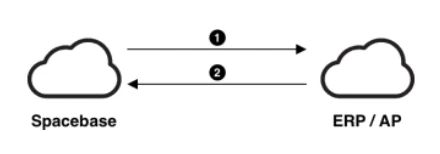
ERP / AP Integration Example
1
Spacebase pushes approved invoices to ERP / AP application
Spacebase account holders with the appropriate permission level will have the ability to upload invoices, approve / reconcile payments, and approve the overall invoices directly from the Spacebase web application. Approved invoices can then be sent directly to your ERP / AP application via our API.
2
The ERP / AP application validates and processes payments, and sends response back to Spacebase
The ERP / AP application will perform basic validation on the invoices / payments data, and then send a response to the Spacebase API with the status of the payments that were processed, and a list of any error messages that were generated.